


Let's do hello.


Put simply, we're a telecoms provider. Operating UK-wide.
Fibre Availability Checker
Powered by BT Wholesale

20tele won't use "alternative networks" due to restrictive geographic footprint.
For 10+ years, we have trusted BT Wholesale & Openreach.
We provide business-grade, high-value broadband, typically through customer referrals to other organisations that want something better than those cheaper, long-term contracts.
There is added reassurance knowing we focus on being Reachable & Responsive.
You won’t be stuck in a queue or waiting days for someone to respond to support tickets. If something needs fixing, we just get on with it. API portals give us complete, real-time control.
Business-grade broadband means to never consider switching provider. If you are still thinking about it, it's not good enough.

If the price got your attention, this probably isn’t the product for you.
This is broadband that is fast and reliable. It performs flawlessly with "up to" speeds exceeding 900Mbps for downloading and 110Mbps uploading. No copper wires!
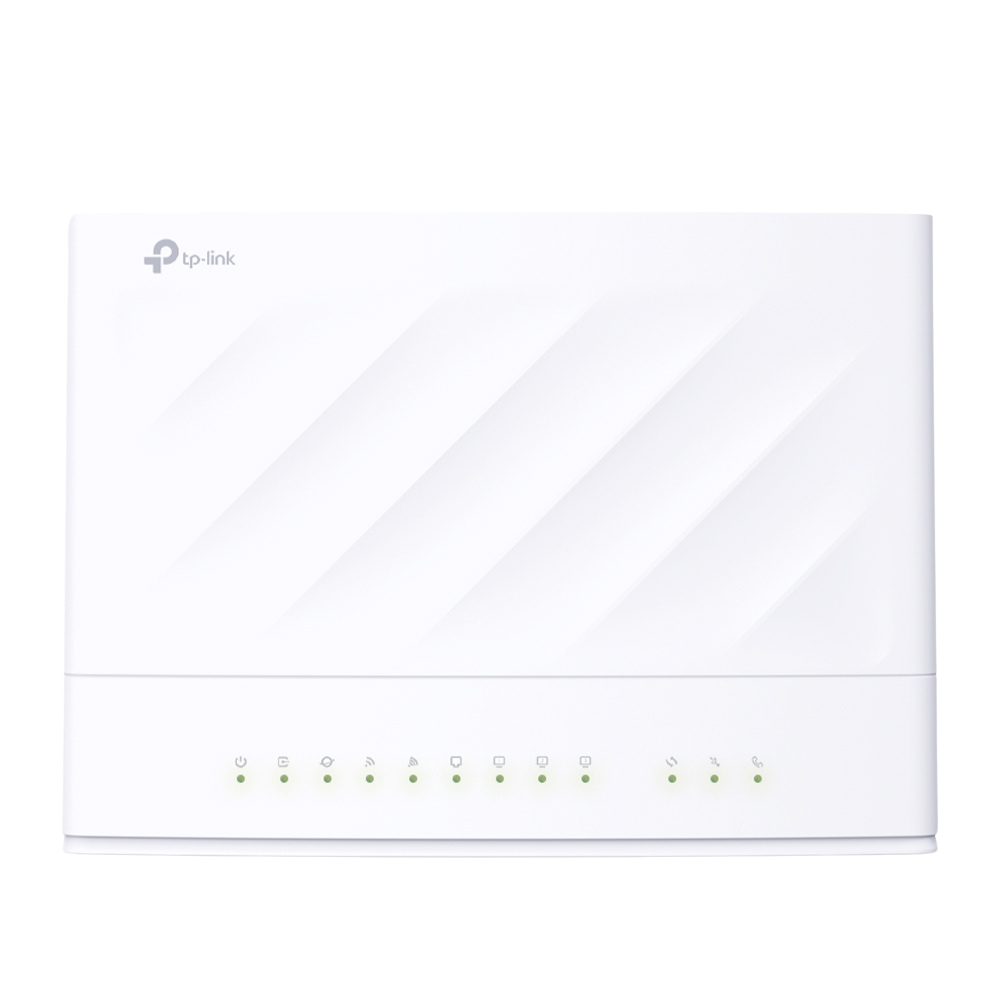
Setup is £5 and includes Premium Installation, upgraded to Advanced Installation for free if that's required, and a pre-configured TP-Link VX230V router. It's then £600 Annually.
Prefer less commitment? It's £100 Setup and £72 Monthly.
If Full Fibre isn’t at your premises yet, it's the next fastest broadband option.
This is boosted broadband over copper lines to the street cabinets, with fibre taking over from there. Typical speeds up to 330Mbps for downloading and 50Mbps for uploading.
Setup is £5 and includes Premium Installation, upgraded to Advanced Installation for free if that's required, and a pre-configured TP-Link VX230V router. It's then £630 Annually.
Prefer less commitment? It's £100 Setup and £75 Monthly.
If Full Fibre hasn’t rolled out near you yet, this will get the job done quickly.
Essentially a standard broadband over copper lines to the street cabinet, with fibre then taking over. Typically up to 80Mbps for downloading and up to 20Mbps for uploading.
Setup is £5 and includes Premium Installation, upgraded to Advanced Installation for free if that's required, and a pre-configured TP-Link VX230V router. It's then £480 Annually.
Prefer less commitment? It's £100 Setup and £60 Monthly.
If you worry about restrictions, that is the only thing that immediately stops.
All broadband connections come with truly unlimited usage. No data caps, no "fair usage" policies, and no traffic shaping. You can download, upload, and stream as much as you need.
If downtime isn’t an option, add a 4G failover you can rely on in an outage.
Your router switches automatically to a 4G Data SIM if the broadband drops, with a Static IPv4 included. It's ideal for organisations that depend on uninterrupted uptime, 24/7.
Failover is included FREE while we carry out testing, which means there is no charge for up to 500MB. We will give all BETA customers the option to top up, continue, or cancel.
If you prefer to Plug & Play, we’ll send out our 3-in-1 Modem + Router + ATA.
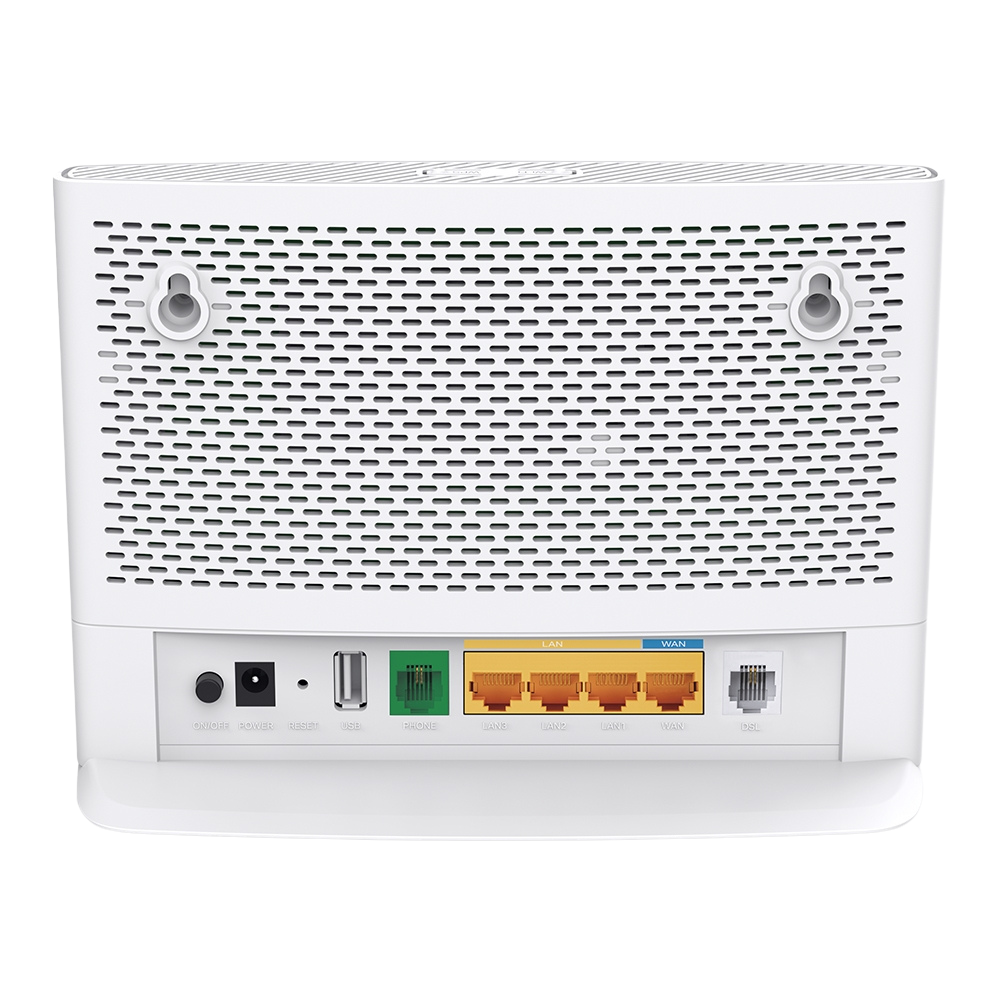
A high-quality TP-Link router is included as standard, pre-configured for any broadband connection, and capable of Gigabit speeds, port for an analogue phone, and Wi-Fi 6.
The TP-Link VX230v was selected for all-round suitability. Should you decide to leave us, the router is yours to keep.
If you need remote access to servers, a fixed routable address is essential.
Every broadband service comes with a Static IPv4 address. It’s essential for security and access to remote servers, or any external devices needing a reliable, stable connection. IPv6 addresses readily available and allocated as required.
If you want it done properly, trust Openreach engineers. Every time.
All broadband orders now include Premium Installation as standard, with free upgrade to Advanced Installation when necessary - increasingly common for a business premises.
If a connection drops, we'll be alerted in seconds and act on it straightaway.
Your broadband is monitored 24/7 for current uptime. We’re informed about connection drops in real-time, so faults can be diagnosed faster than you can probably notice the issue.
Included as part of every broadband service, Monitoring is proactive and constantly watching 24/7, even if you're not.
Let's do hello.
Put simply, we're a
telecoms provider.
Operating UK-wide.
20tele won't use
"alternative networks"
due to restrictive
geographic footprint.
For 10+years, we have trusted
BT Wholesale & Openreach.
We provide business-grade, high-value broadband, typically based on referrals to businesses that want something better than cheaper, long-term contracts.
There's added reassurance
knowing we focus on being
Reachable & Responsive.
You won’t be stuck in a queue or waiting days for someone to respond to support tickets. When something needs fixing, we just get on with it. API portals give us complete, real-time control.
Business-grade broadband means to never consider switching provider. If you are still thinking about it, it's not good enough.
If the price got your attention, this probably isn’t the product for you.
This is broadband that is fast and reliable. It performs flawlessly with "up to" speeds exceeding 900Mbps for downloading and 110Mbps uploading. No copper wires!
Setup is £5 and includes Premium Installation, upgraded to Advanced Installation for free if that's required, and a pre-configured TP-Link VX230V router.
It's then £600 Annually.
Prefer less commitment?
It's £100 Setup and £72 Monthly.
If Full Fibre isn’t at your premises yet, it's the next fastest broadband option.
This is boosted broadband over copper lines to the street cabinets, with fibre taking over from there. Typical speeds up to 330Mbps for downloading and 50Mbps for uploading.
Setup is £5 and includes Premium Installation, upgraded to Advanced Installation for free if that's required, and a pre-configured TP-Link VX230V router.
It's then £630 Annually.
Prefer less commitment?
It's £100 Setup and £75 Monthly.
If Full Fibre hasn’t rolled out near you yet, this will get the job done quickly.
Essentially a standard broadband over copper lines to the street cabinet, with fibre then taking over. Typically up to 80Mbps for downloading and up to 20Mbps for uploading.
Setup is £5 and includes Premium Installation, upgraded to Advanced Installation for free if that's required, and a pre-configured TP-Link VX230V router.
It's then £480 Annually.
Prefer less commitment?
It's £100 Setup and £60 Monthly.
If you worry about restrictions, that is the only thing that immediately stops.
All broadband connections come with truly unlimited usage. No data caps, no "fair usage" policies, and no traffic shaping. You can download, upload, and stream as much as you need.
If downtime isn’t an option, add a 4G failover you can rely on in an outage.
Your router switches automatically to a 4G Data SIM if the broadband drops, with a Static IPv4 included. It's ideal for organisations that depend on uninterrupted uptime, 24/7.
Failover is included FREE while we carry out testing, which means there is no charge for up to 500MB. We will give all BETA customers the option to top up, continue, or cancel.
If you prefer to Plug & Play, we’ll send out our 3-in-1 Modem + Router + ATA.
A high-quality TP-Link router is included as standard, pre-configured for any broadband connection, and capable of Gigabit speeds, port for an analogue phone, and Wi-Fi 6.
The TP-Link VX230v was selected for all-round suitability. Should you decide to leave us, the router is yours to keep.
If you need remote access to servers, a fixed routable address is essential.
Every broadband service comes with a Static IPv4 address. It’s essential for security and access to remote servers, or any external devices needing a reliable, stable connection. IPv6 addresses readily available and allocated as required.
If you want it done properly, trust Openreach engineers. Every time.
All broadband orders now include Premium Installation as standard, with free upgrade to Advanced Installation when necessary - increasingly common for a business premises.
If a connection drops, we'll be alerted in seconds and act on it straightaway.
Your broadband is monitored 24/7 for current uptime. We’re informed about connection drops in real-time, so faults can be diagnosed faster than you can probably notice the issue.
Included as part of every broadband service, Monitoring is proactive and constantly watching 24/7, even if you're not.
Fibre Availability Checker
Powered by BT Wholesale

BROADBAND required? ✅
£9 Monthly / £90 Annually
Assign your existing and newly allocated numbers to an extension, as a landline replacement with access to 10x features, which will enhance the inbound caller experience.
Need more extensions? Upgrade to CALLING CONTINUUM.
Play messages before calls are routed elsewhere with pre-recorded greetings and instructions, saving staff time had they needed to provide a caller with the same information.
Block incoming calls when needed, giving you guaranteed focus time or uninterrupted meetings while keeping caller expectations managed both professionally and efficiently.
Inform users by email when a call has been made to or routed to their extension but was not answered, providing the timestamp, phone number, and contact name if stored.
Route incoming calls to a chosen group of extensions or external numbers, ensuring your staff can answer quickly, and callers receive a timely and reliable service every time.
Specify specific windows of time, such as opening hours, holiday or weekends, which the system recognises and uses alongside Time Conditions to automate routing availability.
Point your existing and newly allocated numbers at the phone system, which will automatically distribute general, specific, and direct dial calls to their pre-set destinations.
Need more numbers? Upgrade to CALLING CONTINUUM.
Divert incoming calls to any another number automatically, making sure inbound calls always reach you wherever you are, without missing important enquiries and opportunities.
Redirect calls to multiple numbers in a sequence, helping you stay reachable whether at the office, home, or on the move, helping to ensure that no important calls are missed.
Comfort callers with music while waiting on hold, ensuring a professional image and improving the caller experience in busy periods, pausing conversations, and transferring calls.
Decide how calls are handled within windows of time as defined by Time Groups, ensuring your callers are sent to an appropriate destination, such as out-of-hours voicemail.
Receive voicemails directly in an email inbox while sending them to a dedicated voice mailbox, so that caller messages are accessible from anywhere, and stored for retrieval later.


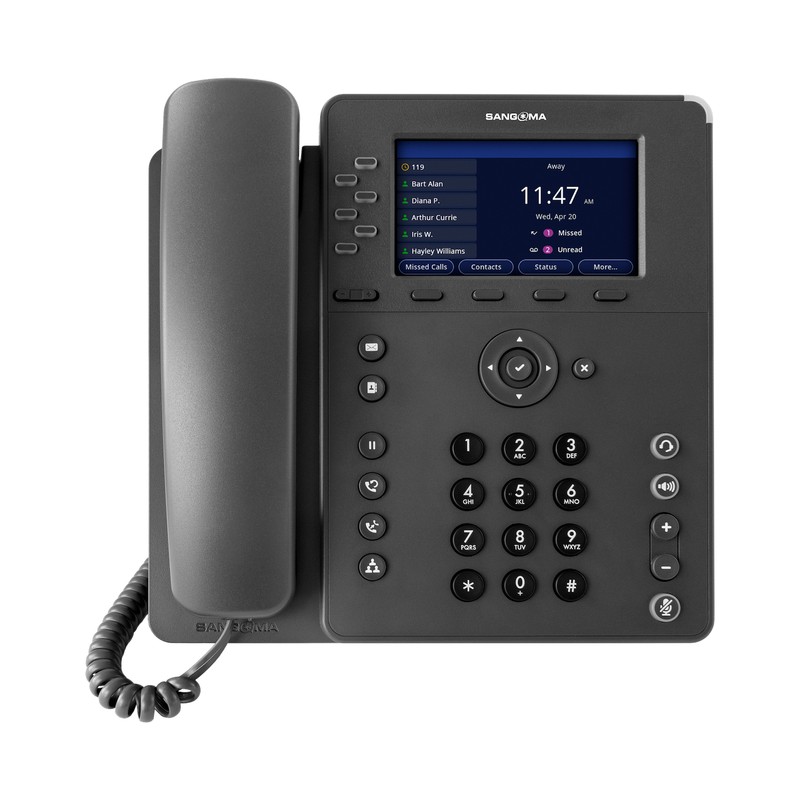
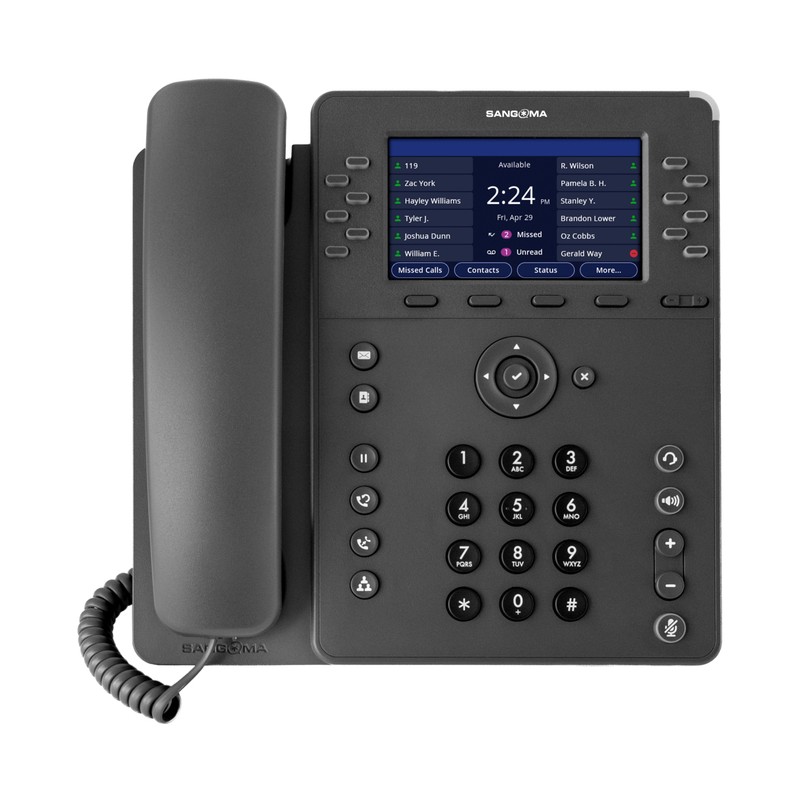
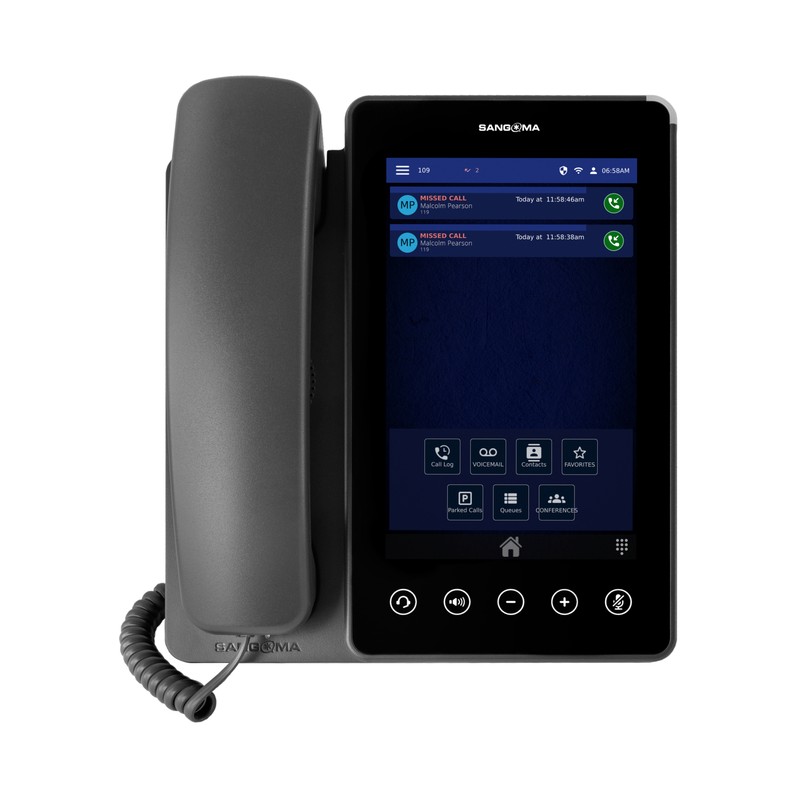


Order online here and get £50 off with promo code CAPABILITY
Give us a call anytime. We're available 24/7 on 0333 45678 20 
£9 Monthly / £90 Annually
BROADBAND required? 
Assign your existing and newly allocated numbers to an extension, as a landline replacement with access to 10x features, which will enhance the inbound caller experience.
Point your existing and newly allocated numbers at the phone system, which will automatically distribute general, specific, and direct dial calls to their pre-set destinations.
Play messages before calls are routed elsewhere with pre-recorded greetings and instructions, saving staff time had they needed to provide a caller with the same information.
Divert incoming calls to any another number automatically, making sure inbound calls always reach you wherever you are, without missing important enquiries and opportunities.
Block incoming calls when needed, giving you guaranteed focus time or uninterrupted meetings while keeping caller expectations managed both professionally and efficiently.
Redirect calls to multiple numbers in a sequence, helping you stay reachable whether at the office, home, or on the move, helping to ensure that no important calls are missed.
Inform users by email when a call has been made to or routed to their extension but was not answered, providing the timestamp, phone number, and contact name if stored.
Comfort callers with music while waiting on hold, ensuring a professional image and improving the caller experience in busy periods, pausing conversations, and transferring calls.
Route incoming calls to a chosen group of extensions or external numbers, ensuring your staff can answer quickly, and callers receive a timely and reliable service every time.
Decide how calls are handled within windows of time as defined by Time Groups, ensuring your callers are sent to an appropriate destination, such as out-of-hours voicemail.
Specify specific windows of time, such as opening hours, holiday or weekends, which the system recognises and uses alongside Time Conditions to automate routing availability.
Receive voicemails directly in an email inbox while sending them to a dedicated voice mailbox, so that caller messages are accessible from anywhere, and stored for retrieval later.


CALLING CONTINUUM
Starting at £1000 Annually
BROADBAND required? ❌
Add users and enable permissions without purchasing additional licenses and software restrictions, allowing your organisation to scale up its operations, without limitations.
Play messages before calls are routed elsewhere with pre-recorded greetings and instructions, saving staff time had they needed to provide a caller with the same information.
Block incoming calls when needed, giving you guaranteed focus time or uninterrupted meetings while keeping caller expectations managed both professionally and efficiently.
Inform users by email when a call has been made to or routed to their extension but was not answered, providing the timestamp, phone number, and contact name if stored.
Route incoming calls to a chosen group of extensions or external numbers, ensuring your staff can answer quickly, and callers receive a timely and reliable service every time.
Specify specific windows of time, such as opening hours, holiday or weekends, which the system recognises and uses alongside Time Conditions to automate routing availability.
Direct your existing and newly allocated numbers at the phone system, which will automatically distribute general, specific, and direct dial calls to their pre-set destinations.
Divert incoming calls to any another number automatically, making sure inbound calls always reach you wherever you are, without missing important enquiries and opportunities.
Redirect calls to multiple numbers in a sequence, helping you stay reachable whether at the office, home, or on the move, helping to ensure that no important calls are missed.
Comfort callers with music while waiting on hold, ensuring a professional image and improving the caller experience in busy periods, pausing conversations, and transferring calls.
Decide how calls are handled within windows of time as defined by Time Groups, ensuring your callers are sent to an appropriate destination, such as out-of-hours voicemail.
Receive voicemails directly in an email inbox while sending them to a dedicated voice mailbox, so that caller messages are accessible from anywhere, and stored for retrieval later.
Permit trusted numbers only, ensuring known callers always get through while blocking unknown numbers collectively, routing them to a pre-set destination for unwanted callers.
Toggle destinations in real-time, allowing manual changes between normal operations, holidays, or unexpected events while ensuring callers always reach the right destination.
Host group calls with multiple participants, enabling quick decision-making, instant collaboration, and reduced travel by bringing everyone together in a shared conversation.
Authorise dial-in with a PIN, letting remote staff make calls through the internal phone system, without dialling from an extension, as if the dialled calls had originated internally.
Use short dial codes to access system functions quickly, letting you manage calls, voicemail, and settings without navigating through complex phone menus and wasting time.
Select different language prompts for your callers, ensuring automated interactions are played in a preferred language for clearer communication and improved accessibility.
Make one-way announcements and start instant two-way conversations through phones or tannoy systems, letting a group hear the messaging without initiating individual calls.
Balance workloads by placing incoming calls in an order, distributing to available staff, reducing missed enquiries and ensuring a fairer experience for waiting callers.
Distribute one voicemail to multiple mailboxes at once, saving time and ensuring the same recording reaches all required recipients simultaneously across their extensions.
Prevent unwanted callers by blocking specific numbers, protecting your organisation from persistent nuisance calls or harassment, while ensuring availability for genuine calls.
Force a call to be recorded (or not recorded) based on a call flow and override all other recording settings, incorporating any announcements, hold music etc, prior to being answered.
Access a central directory of contacts, saved once for shared use across permitted users, ensuring accurate caller information is always available quickly and consistently.
Convert incoming faxes into digital files delivered by email, reducing paper waste, saving on storage space, and making important business documents easier to securely manage.
Guide callers with automated menu options, letting them choose destinations by pressing numbers, which reduces unnecessary transfers, saves time, and ensures efficiency.
Send calls to destinations not readily available elsewhere, enabling direct routing to external numbers, feature codes, and other single numbers as if they were then being dialled.
Keep a live call in a numbered slot, enabling retrieval from another phone by dialling the assigned slot number in the parking lot, improving flexibility across busy extensions.
Elevate specific callers entering a queue, ensuring urgent or high-value enquiries can be dealt with sooner, while processing the remaining callers in the queue as normal.
Schedule automated wake up calls to ring at chosen times, ensuring reminders, alerts, or daily prompts are delivered reliably without relying on manual effort to make the call.
- Grant elevated permissions to trusted staff, enabling them to manage configurations, monitor reporting, and maintain smooth operation while keeping some settings protected.
Edit the hidden options beyond everyday use, enabling deeper configuration to fine-tune behaviour while keeping powerful system controls accessible only when necessary.
Define global parameters for Asterisk, controlling how calls process, ensuring compatibility and stability between the system itself, extensions, SIP trunks, and external networks.
Process large sets of extensions, users, and other settings in one upload or download action, saving time and reducing errors in contrast to adding the configurations individually.
Manage security certificates for encrypted connections, ensuring the web interface, calls, and registering endpoints, are protected and compliant with modern SSL standards.
Establish unique endpoints in the dialplan, allowing calls to be directed to advanced logic, scripts, and integrations beyond the range of standard destination options.
Organise storage locations for recordings, backups, or prompts, keeping files structured, accessible, and reliably available for use across the phone system when required.
Steer incoming numbers to the right destination, ensuring calls reach extensions, queues, or voicemail as required, keeping call routing consistent, efficient, and reliable.
Enforce verification for logins by combining passwords with one-time passwords (OTP), applying best practice against unauthorised access to help keep accounts secure.
Allocate sets of PIN codes to authorise outbound calls, adding an extra security layer and helping track or restrict access where necessary and controlling general access.
Download professional recordings for default phone system prompts, giving your callers clear interactions and ensuring the experience matches their local linguistic requirements.
Create custom audio prompts for menus, announcements, or voicemail greetings, making it easy to update messages and inform callers with accurate and professional direction.
Install the latest software versions to improve security, fix bugs, and add valuable new features, maintaining reliability, functionalty, and stability across your system at all times.
Delegate permissions and access levels centrally, where administrators create and manage users, reset passwords, and widgets, keeping access straightforward and secure.
Configure settings and features, and oversee the phone system from a web interface, providing visibility, control, and streamlined administration across the phone system.
Run commands within the Asterisk command line interface, facilitating real-time actions, troubleshooting, visibility and intuitive back-end control over features and extensions.
Safeguard configurations by creating scheduled backups and restore when required, protecting against failures and ensuring continuity if systems ever need to be recovered.
Sync external calendars or create local ones to automate call routing for meetings, holidays, closures, events, working with Time Conditions to switch calls between destinations.
Modify configuration files directly from the web interface, giving advanced users quick access to system settings without needing external tools or command line editing.
Build intelligent and highly flexible call routing rules using live database lookups or caller input, directing incoming calls dynamically based on current data or conditions.
Protect the phone system with a native firewall, controlling access by IP address or domain name, blocking unwanted traffic while allowing trusted connections to pass securely.
Map custom feature codes to applications like queues or IVRs to help users and callers reach destinations when the feature code would not have been accessible by default.
Determine how outbound calls are routed, selecting trunks and patterns to ensure reliability, manage costs effectively, and maintain proper outbound routing across extensions.
Set custom presence states such as available, busy, or away, helping colleagues choose appropriate status for improved call handling, coordination, and better teamwork.
Oversee the core administrative functions like networking, updates, and services from one place, simplifying technical tasks and reducing the need for manual intervention.
Connect to external networks through SIP trunks, enabling both inbound and outbound calling, supporting multiple call providers, and ensuring reliable external communications.
Allow limited access to a personal control panel to manage voicemail, recordings, presence, and basic settings, giving users flexibility without needing administrator involvement.
Supervise mailboxes centrally, letting administrators set parameters like storage limits, and configure options to keep mailboxes well organised, accessible, and manageable.
Check live data including active channels, registrations, current active calls, and performance data, to assist with monitoring, troubleshooting, and phone system diagnostics.
Retrieve call records by date and time, source, destination, and total duration, enabling administrators to verify billing accuracy and monitor calling behaviour in fine detail.
Inspect active extension features including Follow-Me, Call Forwarding, Do Not Disturb (DND), and Call Waiting, giving administrators real-time visibility into current user activity.
Track granular data generated by calls, capturing activity for through analysis, troubleshooting, audits, or compliance while giving visibility into performance and caller behaviour.
Monitor current system status, resource statistics, and important notifications in a single view, giving permitted administrators immediate awareness of potential issues.
Analyse system logfiles to identify errors, warnings, and operational events, enabling administrators to understand activity, spot issues, and maintain reliable performance.

Pro

Routing

Softphones

Pro

Sangoma Scribe is rewriting the rules calls
From staff training to reviewing complaints, call recording has been a traditional constant for many businesses. But, it can be rather time-consuming (and even uncomfortable!) to listen back to the audio. Scribe is changing all that, with AI-generated transcription presented intuitively within the phone system software to users. Scribe will even transcribe your voicemails.
In testing, we have found it effortless to glance back over the text. It's accurate and fast, and we've been surprised at how much easier it has become to retrieve what's required. Scribe makes listening back feel like an old-fashioned chore, especially for voicemails. You can choose which users have it, and enable/disable for inbound calls, outbound calls, or both.
£20 Monthly for 1000 minutes of processed audio / £240 Pre-Pay for 12x 1000 minutes
£30 for each 1000-minute Top Up (valid for 3 months). Plus, your first Top Up order is on us.
Scribe provides transcription services for CALLING CONTINUUM and CONTINUUM PRO, allowing you to easily extract valuable insights from your audio files. Get instant transcripts, summaries, and call sentiment analysis from your call recordings and voicemails.


How we build Quotes for CALLING CONTINUUM // Simple mode:
Base Price = £721 Annually + Per-Endpoint Charge (3 minimum)
• £102 Annually Per-Endpoint (Heavy Usage – Up to 150 Endpoints)
• £99 Annually Per-Endpoint (High Usage – Up to 75 Endpoints)
• £96 Annually Per-Endpoint (Mid Usage – Up to 50 Endpoints)
• £93 Annually Per-Endpoint (Low Usage – Up to 25 Endpoints)
+ £12 Annually for each Telephone Number (first 10 included free)
Give us a call anytime. We're available 24/7 on 0333 45678 20
CALLING CONTINUUM
Starting at £1000 Annually
BROADBAND required? ❌
Add users and enable permissions without purchasing additional licenses and software restrictions, allowing your organisation to scale up its operations, without limitations.
Direct your existing and newly allocated numbers at the phone system, which will automatically distribute general, specific, and direct dial calls to their pre-set destinations.
Play messages before calls are routed elsewhere with pre-recorded greetings and instructions, saving staff time had they needed to provide a caller with the same information.
Divert incoming calls to any another number automatically, making sure inbound calls always reach you wherever you are, without missing important enquiries and opportunities.
Block incoming calls when needed, giving you guaranteed focus time or uninterrupted meetings while keeping caller expectations managed both professionally and efficiently.
Redirect calls to multiple numbers in a sequence, helping you stay reachable whether at the office, home, or on the move, helping to ensure that no important calls are missed.
Inform users by email when a call has been made to or routed to their extension but was not answered, providing the timestamp, phone number, and contact name if stored.
Comfort callers with music while waiting on hold, ensuring a professional image and improving the caller experience in busy periods, pausing conversations, and transferring calls.
Route incoming calls to a chosen group of extensions or external numbers, ensuring your staff can answer quickly, and callers receive a timely and reliable service every time.
Decide how calls are handled within windows of time as defined by Time Groups, ensuring your callers are sent to an appropriate destination, such as out-of-hours voicemail.
Specify specific windows of time, such as opening hours, holiday or weekends, which the system recognises and uses alongside Time Conditions to automate routing availability.
Receive voicemails directly in an email inbox while sending them to a dedicated voice mailbox, so that caller messages are accessible from anywhere, and stored for retrieval later.
Permit trusted numbers only, ensuring known callers always get through while blocking unknown numbers collectively, routing them to a pre-set destination for unwanted callers.
Prevent unwanted callers by blocking specific numbers, protecting your organisation from persistent nuisance calls or harassment, while ensuring availability for genuine calls.
Toggle destinations in real-time, allowing manual changes between normal operations, holidays, or unexpected events while ensuring callers always reach the right destination.
Force a call to be recorded (or not recorded) based on a call flow and override all other recording settings, incorporating any announcements, hold music etc, prior to being answered.
Host group calls with multiple participants, enabling quick decision-making, instant collaboration, and reduced travel by bringing everyone together in a shared conversation.
Access a central directory of contacts, saved once for shared use across permitted users, ensuring accurate caller information is always available quickly and consistently.
Authorise dial-in with a PIN, letting remote staff make calls through the internal phone system, without dialling from an extension, as if the dialled calls had originated on site.
Convert incoming faxes into digital files delivered by email, reducing paper waste, saving on storage space, and making important business documents easier to securely manage.
Use short dial codes to access system functions quickly, letting you manage calls, voicemail, and settings without navigating through complex phone menus and wasting time.
Guide callers with automated menu options, letting them choose destinations by pressing numbers, which reduces unnecessary transfers, saves time, and ensures efficiency.
Select different language prompts for your callers, ensuring automated interactions are played in a preferred language for clearer communication and improved accessibility.
Send calls to destinations not readily available elsewhere, enabling direct routing to external numbers, feature codes, and other single numbers as if they were then being dialled.
Make one-way announcements and start instant two-way conversations through phones or tannoy systems, letting a group hear the messaging without initiating individual calls.
Keep a live call in a numbered slot, enabling retrieval from another phone by dialling the assigned slot number in the parking lot, improving flexibility across busy extensions.
Balance workloads by placing incoming calls in an order, distributing to available staff, reducing missed enquiries and ensuring a fairer experience for waiting callers.
Elevate specific callers entering a queue, ensuring urgent or high-value enquiries can be dealt with sooner, while processing the remaining callers in the queue as normal.
Distribute one voicemail to multiple mailboxes at once, saving time and ensuring the same recording reaches all required recipients simultaneously across their extensions.
Schedule automated wake up calls to ring at chosen times, ensuring reminders, alerts, or daily prompts are delivered reliably without relying on manual effort to make the call.
Grant elevated permissions to trusted staff, enabling them to manage configurations, monitor reporting, and maintain smooth operation while keeping some settings protected.
Configure settings and features, and oversee the phone system from a web interface, providing visibility, control, and streamlined administration across the phone system.
Edit the hidden options beyond everyday use, enabling deeper configuration to fine-tune behaviour while keeping powerful system controls accessible only when necessary.
ChatGPT said:
Run commands within the Asterisk command line interface, facilitating real-time actions, troubleshooting, visibility and intuitive back-end control over features and extensions.
Define global parameters for Asterisk, controlling how calls process, ensuring compatibility and stability between the system itself, extensions, SIP trunks, and external networks.
Safeguard configurations by creating scheduled backups and restore when required, protecting against failures and ensuring continuity if systems ever need to be recovered.
Process large sets of extensions, users, and other settings in one upload or download action, saving time and reducing errors in contrast to adding the configurations individually.
Sync external calendars or create local ones to automate call routing for meetings, holidays, closures, events, working with Time Conditions to switch calls between destinations.
Manage security certificates for encrypted connections, ensuring the web interface, calls, and registering endpoints, are protected and compliant with modern SSL standards.
Modify configuration files directly from the web interface, giving advanced users quick access to system settings without needing external tools or command line editing.
Establish unique endpoints in the dialplan, allowing calls to be directed to advanced logic, scripts, and integrations beyond the range of standard destination options.
Build intelligent and highly flexible call routing rules using live database lookups or caller input, directing incoming calls dynamically based on current data or conditions.
Organise storage locations for recordings, backups, or prompts, keeping files structured, accessible, and reliably available for use across the phone system when required.
Protect the phone system with a native firewall, controlling access by IP address or domain name, blocking unwanted traffic while allowing trusted connections to pass securely.
Steer incoming numbers to the right destination, ensuring calls reach extensions, queues, or voicemail as required, keeping call routing consistent, efficient, and reliable.
Map custom feature codes to applications like queues or IVRs to help users and callers reach destinations when the feature code would not have been accessible by default.
Secure the phone system for administrators and users with an extra security layer by requiring a password and second factor, helping protect accounts from compromise.
Determine how outbound calls are routed, selecting trunks and patterns to ensure reliability, manage costs effectively, and maintain proper outbound routing across extensions.
Allocate sets of PIN codes to authorise outbound calls, adding an extra security layer and helping track or restrict access where necessary and controlling general access.
Set custom presence states such as available, busy, or away, helping colleagues choose appropriate status for improved call handling, coordination, and better teamwork.
Download professional recordings for default phone system prompts, giving your callers clear interactions and ensuring the experience matches their local linguistic requirements.
Oversee the core administrative functions like networking, updates, and services from one place, simplifying technical tasks and reducing the need for manual intervention.
Create custom audio prompts for menus, announcements, or voicemail greetings, making it easy to update messages and inform callers with accurate and professional direction.
Connect to external networks through SIP trunks, enabling both inbound and outbound calling, supporting multiple call providers, and ensuring reliable external communications.
Install the latest software versions to improve security, fix bugs, and add valuable new features, maintaining reliability, functionalty, and stability across your system at all times.
Allow limited access to a personal control panel to manage voicemail, recordings, presence, and basic settings, giving users flexibility without needing administrator involvement.
ChatGPT said:
Delegate permissions and access levels centrally, where administrators create and manage users, reset passwords, and widgets, keeping access straightforward and secure.
Supervise mailboxes centrally, letting administrators set parameters like storage limits, and configure options to keep mailboxes well organised, accessible, and manageable.
Check live data including active channels, registrations, current active calls, and performance data, to assist with monitoring, troubleshooting, and phone system diagnostics.
Track granular data generated by calls, capturing activity for through analysis, troubleshooting, audits, or compliance while giving visibility into performance and caller behaviour.
Retrieve call records by date and time, source, destination, and total duration, enabling administrators to verify billing accuracy and monitor calling behaviour in fine detail.
Monitor current system status, resource statistics, and important notifications in a single view, giving permitted administrators immediate awareness of potential issues.
Inspect active extension features including Follow-Me, Call Forwarding, Do Not Disturb (DND), and Call Waiting, giving administrators real-time visibility into current user activity.
Analyse system logfiles to identify errors, warnings, and operational events, enabling administrators to understand activity, spot issues, and maintain reliable performance.
Pro
Routing
Softphones
Pro
Sangoma Scribe is rewriting the rules calls
From staff training to reviewing complaints, call recording has been a traditional constant for many businesses. But, it can be rather time-consuming (and even uncomfortable!) to listen back to the audio. Scribe is changing all that, with AI-generated transcription presented intuitively within the phone system software to users. Scribe will even transcribe your voicemails.
In testing, we have found it effortless to glance back over the text. It's accurate and fast, and we've been surprised at how much easier it has become to retrieve what's required. Scribe makes listening back feel like an old-fashioned chore, especially for voicemails. You can choose which users have it, and enable/disable for inbound calls, outbound calls, or both.
£20 Monthly for 1000 minutes of processed audio / £240 Pre-Pay for 12x 1000 minutes
£30 for each 1000-minute Top Up (valid for 3 months). Plus, the first Top Up ordered is on us.
Scribe provides transcription services for CALLING CONTINUUM and CONTINUUM PRO, allowing you to easily extract valuable insights from your audio files. Get instant transcripts, summaries, and call sentiment analysis from your call recordings and voicemails.
How we build Quotes for
CALLING CONTINUUM
// Simple mode:
Base Price = £721 Annually + Per-Endpoint Charge (3 minimum)
• £102 Annually Per-Endpoint (Heavy Usage – Up to 150 Endpoints)
• £99 Annually Per-Endpoint (High Usage – Up to 75 Endpoints)
• £96 Annually Per-Endpoint (Mid Usage – Up to 50 Endpoints)
• £93 Annually Per-Endpoint (Low Usage – Up to 25 Endpoints)
+ £12 Annually for each Telephone Number (first 10 included free)
Excellent on Trustpilot
⭐ ⭐ ⭐ ⭐ ⭐
No bull friendly upfront service.
It is refreshing to deal with a company that is not trying to rip you off with microscopic small print with hidden charges and rollover tie ins you never were told about at day 1. This company shall continue to thrive with such great customer service and wishing them continuing success as they deserve it.
CEO | Paul Anton Limited

We use 20tele for a number of our businesses over a number of years. The team are super supportive - easy to reach and very responsive. The handsets, DDIs and numbers provisioned for us are always priced competitively and consistent. Would recommend this company to anyone looking for telecoms!
The company I have worked for for three years has 20tele look after their phones, including managing the on-call service that we provide and the mobile office number phones. For the last six months or so I have looked after the on-call weekly changes. Every single time myself or one of my colleagues has interacted with 20tele they have been friendly, helpful, and quick to reply, often immediately resolving issues. I would describe 20tele as having perfect customer service and recommend them without hesitation.
Friendly and knowledgeable service. Any issues Kieran and Sam are always available to help resolve. Highly recommended.
Sam and Kieran are amazing and so helpful!
20tele.com make everything so easy and keep pricing realistic, so glad I made the move.
Always a fabulous, professional, efficient and personable service
Consistently good service over many years. Would highly recommend 20tele.com
Imagine a company who had all the products of the telecommunications giants at a fraction of the price. 20tele.com not only provides like for like cheaper than anyone else but with customer service next to none. Sam and Kieran are an exceptional ma and pa store in a world without them. You might think they made this excellent review themselves but I can assure you I don’t work for them. I don’t usually bother to write reviews but 20tele.com deserve your custom.
20tele.com are the ideal partner for etaCsolutions, as they understand the importance that their services deliver to ensuring our business runs efficiently.
Review 20tele.com on Trustpilot here
continuum pro
Starting at £100 Monthly
BROADBAND required? ❌
Add users and enable permissions without purchasing additional licenses and software restrictions, allowing your organisation to scale up its operations, without limitations.
Play messages before calls are routed elsewhere with pre-recorded greetings and instructions, saving staff time had they needed to provide a caller with the same information.
Block incoming calls when needed, giving you guaranteed focus time or uninterrupted meetings while keeping caller expectations managed both professionally and efficiently.
Inform users by email when a call has been made to or routed to their extension but was not answered, providing the timestamp, phone number, and contact name if stored.
Route incoming calls to a chosen group of extensions or external numbers, ensuring your staff can answer quickly, and callers receive a timely and reliable service every time.
Specify specific windows of time, such as opening hours, holiday or weekends, which the system recognises and uses alongside Time Conditions to automate routing availability.
Direct your existing and newly allocated numbers at the phone system, which will automatically distribute general, specific, and direct dial calls to their pre-set destinations.
Divert incoming calls to any another number automatically, making sure inbound calls always reach you wherever you are, without missing important enquiries and opportunities.
Redirect calls to multiple numbers in a sequence, helping you stay reachable whether at the office, home, or on the move, helping to ensure that no important calls are missed.
Comfort callers with music while waiting on hold, ensuring a professional image and improving the caller experience in busy periods, pausing conversations, and transferring calls.
Decide how calls are handled within windows of time as defined by Time Groups, ensuring your callers are sent to an appropriate destination, such as out-of-hours voicemail.
Receive voicemails directly in an email inbox while sending them to a dedicated voice mailbox, so that caller messages are accessible from anywhere, and stored for retrieval later.
Permit trusted numbers only, ensuring known callers always get through while blocking unknown numbers collectively, routing them to a pre-set destination for unwanted callers.
Toggle destinations in real-time, allowing manual changes between normal operations, holidays, or unexpected events while ensuring callers always reach the right destination.
Host group calls with multiple participants, enabling quick decision-making, instant collaboration, and reduced travel by bringing everyone together in a shared conversation.
Authorise dial-in with a PIN, letting remote staff make calls through the internal phone system, without dialling from an extension, as if the dialled calls had originated on site.
Use short dial codes to access system functions quickly, letting you manage calls, voicemail, and settings without navigating through complex phone menus and wasting time.
Select different language prompts for your callers, ensuring automated interactions are played in a preferred language for clearer communication and improved accessibility.
Keep a live call in a numbered slot, enabling retrieval from another phone by dialling the assigned slot number in the parking lot, improving flexibility across busy extensions.
Balance workloads by placing incoming calls in an order, distributing to available staff, reducing missed enquiries and ensuring a fairer experience for waiting callers.
Distribute one voicemail to multiple mailboxes at once, saving time and ensuring the same recording reaches all required recipients simultaneously across their extensions.
Prevent unwanted callers by blocking specific numbers, protecting your organisation from persistent nuisance calls or harassment, while ensuring availability for genuine calls.
Force a call to be recorded (or not recorded) based on a call flow and override all other recording settings, incorporating any announcements, hold music etc, prior to being answered.
Access a central directory of contacts, saved once for shared use across permitted users, ensuring accurate caller information is always available quickly and consistently.
Convert incoming faxes into digital files delivered by email, reducing paper waste, saving on storage space, and making important business documents easier to securely manage.
Guide callers with automated menu options, letting them choose destinations by pressing numbers, which reduces unnecessary transfers, saves time, and ensures efficiency.
Send calls to destinations not readily available elsewhere, enabling direct routing to external numbers, feature codes, and other single numbers as if they were then being dialled.
Make one-way announcements and start instant two-way conversations through phones or tannoy systems, letting a group hear the messaging without initiating individual calls.
Elevate specific callers entering a queue, ensuring urgent or high-value enquiries can be dealt with sooner, while processing the remaining callers in the queue as normal.
Schedule automated wake up calls to ring at chosen times, ensuring reminders, alerts, or daily prompts are delivered reliably without relying on manual effort to make the call.
Grant elevated permissions to trusted staff, enabling them to manage configurations, monitor reporting, and maintain smooth operation while keeping some settings protected.
Edit the hidden options beyond everyday use, enabling deeper configuration to fine-tune behaviour while keeping powerful system controls accessible only when necessary.
Define global parameters for Asterisk, controlling how calls process, ensuring compatibility and stability between the system itself, extensions, SIP trunks, and external networks.
Process large sets of extensions, users, and other settings in one upload or download action, saving time and reducing errors in contrast to adding the configurations individually.
Manage security certificates for encrypted connections, ensuring the web interface, calls, and registering endpoints, are protected and compliant with modern SSL standards.
Establish unique endpoints in the dialplan, allowing calls to be directed to advanced logic, scripts, and integrations beyond the range of standard destination options.
Organise storage locations for recordings, backups, or prompts, keeping files structured, accessible, and reliably available for use across the phone system when required.
Steer incoming numbers to the right destination, ensuring calls reach extensions, queues, or voicemail as required, keeping call routing consistent, efficient, and reliable.
Enforce verification for logins by combining passwords with one-time passwords (OTP), applying best practice against unauthorised access and to help keep accounts secure.
Allocate sets of PIN codes to authorise outbound calls, adding an extra security layer and helping track or restrict access where necessary and controlling general access.
Download professional recordings for default phone system prompts, giving your callers clear interactions and ensuring the experience matches their local linguistic requirements.
Create custom audio prompts for menus, announcements, or voicemail greetings, making it easy to update messages and inform callers with accurate and professional direction.
Install the latest software versions to improve security, fix bugs, and add valuable new features, maintaining reliability, functionalty, and stability across your system at all times.
ChatGPT said:
Delegate permissions and access levels centrally, where administrators create and manage users, reset passwords, and widgets, keeping access straightforward and secure.
Configure settings and features, and oversee the phone system from a web interface, providing visibility, control, and streamlined administration across the phone system.
ChatGPT said:
Run commands within the Asterisk command line interface, facilitating real-time actions, troubleshooting, visibility and intuitive back-end control over features and extensions.
Safeguard configurations by creating scheduled backups and restore when required, protecting against failures and ensuring continuity if systems ever need to be recovered.
Sync external calendars or create local ones to automate call routing for meetings, holidays, closures, events, working with Time Conditions to switch calls between destinations.
Modify configuration files directly from the web interface, giving advanced users quick access to system settings without needing external tools or command line editing.
Build intelligent and highly flexible call routing rules using live database lookups or caller input, directing incoming calls dynamically based on current data or conditions.
Protect the phone system with a native firewall, controlling access by IP address or domain name, blocking unwanted traffic while allowing trusted connections to pass securely.
Map custom feature codes to applications like queues or IVRs to help users and callers reach destinations when the feature code would not have been accessible by default.
Determine how outbound calls are routed, selecting trunks and patterns to ensure reliability, manage costs effectively, and maintain proper outbound routing across extensions.
Set custom presence states such as available, busy, or away, helping colleagues choose appropriate status for improved call handling, coordination, and better teamwork.
Oversee the core administrative functions like networking, updates, and services from one place, simplifying technical tasks and reducing the need for manual intervention.
Connect to external networks through SIP trunks, enabling both inbound and outbound calling, supporting multiple call providers, and ensuring reliable external communications.
Allow limited access to a personal control panel to manage voicemail, recordings, presence, and basic settings, giving users flexibility without needing administrator involvement.
Supervise mailboxes centrally, letting administrators set parameters like storage limits, and configure options to keep mailboxes well organised, accessible, and manageable.
Check live data including active channels, registrations, current active calls, and performance data, to assist with monitoring, troubleshooting, and phone system diagnostics.
Retrieve call records by date and time, source, destination, and total duration, enabling administrators to verify billing accuracy and monitor calling behaviour in fine detail.
Inspect active extension features including Follow-Me, Call Forwarding, Do Not Disturb (DND), and Call Waiting, giving administrators real-time visibility into current user activity.
Track granular data generated by calls, capturing activity for through analysis, troubleshooting, audits, or compliance while giving visibility into performance and caller behaviour.
Monitor current system status, resource statistics, and important notifications in a single view, giving permitted administrators immediate awareness of potential issues.
Analyse system logfiles to identify errors, warnings, and operational events, enabling administrators to understand activity, spot issues, and maintain reliable performance.

Service

Reports

Pro
Pro

Pro

Pro
Softphones

Link

Notify
Pro

Pro

Reports
Sangoma Scribe is rewriting the rules calls
From staff training to reviewing complaints, call recording has been a traditional constant for many businesses. But, it can be rather time-consuming (and even uncomfortable!) to listen back to the audio. Scribe is changing all that, with AI-generated transcription presented intuitively within the phone system software to users. Scribe will even transcribe your voicemails.
In testing, we have found it effortless to glance back over the text. It's accurate and fast, and we've been surprised at how much easier it has become to retrieve what's required. Scribe makes listening back feel like an old-fashioned chore, especially for voicemails. You can choose which users have it, and enable/disable for inbound calls, outbound calls, or both.
£20 Monthly for 1000 minutes of processed audio / £240 Pre-Pay for 12x 1000 minutes
£30 for each 1000-minute Top Up (valid for 3 months). Plus, your first Top Up order is on us.
Scribe provides transcription services for CALLING CONTINUUM and CONTINUUM PRO, allowing you to easily extract valuable insights from your audio files. Get instant transcripts, summaries, and call sentiment analysis from your call recordings and voicemails.
How we build Quotes for CONTINUUM PRO // Simple mode:
Base Price = £46.75 Monthly + Per-Endpoint Charge (3 minimum)
• £18.50 Monthly Per-Endpoint (Heavy Usage – Up to 150 Endpoints)
• £18.25 Monthly Per-Endpoint (High Usage – Up to 75 Endpoints)
• £18.00 Monthly Per-Endpoint (Mid Usage – Up to 50 Endpoints)
• £17.75 Monthly Per-Endpoint (Low Usage – Up to 25 Endpoints)
+ £1 Monthly for each Telephone Number (first 10 included free)
Give us a call anytime. We're available 24/7 on 0333 45678 20
continuum pro
Starting at £100 Monthly
BROADBAND required? ❌
Add users and enable permissions without purchasing additional licenses and software restrictions, allowing your organisation to scale up its operations, without limitations.
Direct your existing and newly allocated numbers at the phone system, which will automatically distribute general, specific, and direct dial calls to their pre-set destinations.
Play messages before calls are routed elsewhere with pre-recorded greetings and instructions, saving staff time had they needed to provide a caller with the same information.
Divert incoming calls to any another number automatically, making sure inbound calls always reach you wherever you are, without missing important enquiries and opportunities.
Block incoming calls when needed, giving you guaranteed focus time or uninterrupted meetings while keeping caller expectations managed both professionally and efficiently.
Redirect calls to multiple numbers in a sequence, helping you stay reachable whether at the office, home, or on the move, helping to ensure that no important calls are missed.
Inform users by email when a call has been made to or routed to their extension but was not answered, providing the timestamp, phone number, and contact name if stored.
Comfort callers with music while waiting on hold, ensuring a professional image and improving the caller experience in busy periods, pausing conversations, and transferring calls.
Route incoming calls to a chosen group of extensions or external numbers, ensuring your staff can answer quickly, and callers receive a timely and reliable service every time.
Decide how calls are handled within windows of time as defined by Time Groups, ensuring your callers are sent to an appropriate destination, such as out-of-hours voicemail.
Specify specific windows of time, such as opening hours, holiday or weekends, which the system recognises and uses alongside Time Conditions to automate routing availability.
Receive voicemails directly in an email inbox while sending them to a dedicated voice mailbox, so that caller messages are accessible from anywhere, and stored for retrieval later.
Permit trusted numbers only, ensuring known callers always get through while blocking unknown numbers collectively, routing them to a pre-set destination for unwanted callers.
Prevent unwanted callers by blocking specific numbers, protecting your organisation from persistent nuisance calls or harassment, while ensuring availability for genuine calls.
Toggle destinations in real-time, allowing manual changes between normal operations, holidays, or unexpected events while ensuring callers always reach the right destination.
Force a call to be recorded (or not recorded) based on a call flow and override all other recording settings, incorporating any announcements, hold music etc, prior to being answered.
Host group calls with multiple participants, enabling quick decision-making, instant collaboration, and reduced travel by bringing everyone together in a shared conversation.
Access a central directory of contacts, saved once for shared use across permitted users, ensuring accurate caller information is always available quickly and consistently.
Authorise dial-in with a PIN, letting remote staff make calls through the internal phone system, without dialling from an extension, as if the dialled calls had originated on site.
Convert incoming faxes into digital files delivered by email, reducing paper waste, saving on storage space, and making important business documents easier to securely manage.
Use short dial codes to access system functions quickly, letting you manage calls, voicemail, and settings without navigating through complex phone menus and wasting time.
Guide callers with automated menu options, letting them choose destinations by pressing numbers, which reduces unnecessary transfers, saves time, and ensures efficiency.
Select different language prompts for your callers, ensuring automated interactions are played in a preferred language for clearer communication and improved accessibility.
Send calls to destinations not readily available elsewhere, enabling direct routing to external numbers, feature codes, and other single numbers as if they were then being dialled.
Make one-way announcements and start instant two-way conversations through phones or tannoy systems, letting a group hear the messaging without initiating individual calls.
Keep a live call in a numbered slot, enabling retrieval from another phone by dialling the assigned slot number in the parking lot, improving flexibility across busy extensions.
Balance workloads by placing incoming calls in an order, distributing to available staff, reducing missed enquiries and ensuring a fairer experience for waiting callers.
Elevate specific callers entering a queue, ensuring urgent or high-value enquiries can be dealt with sooner, while processing the remaining callers in the queue as normal.
Distribute one voicemail to multiple mailboxes at once, saving time and ensuring the same recording reaches all required recipients simultaneously across their extensions.
Schedule automated wake up calls to ring at chosen times, ensuring reminders, alerts, or daily prompts are delivered reliably without relying on manual effort to make the call.
Grant elevated permissions to trusted staff, enabling them to manage configurations, monitor reporting, and maintain smooth operation while keeping some settings protected.
Configure settings and features, and oversee the phone system from a web interface, providing visibility, control, and streamlined administration across the phone system.
Edit the hidden options beyond everyday use, enabling deeper configuration to fine-tune behaviour while keeping powerful system controls accessible only when necessary.
ChatGPT said:
Run commands within the Asterisk command line interface, facilitating real-time actions, troubleshooting, visibility and intuitive back-end control over features and extensions.
Define global parameters for Asterisk, controlling how calls process, ensuring compatibility and stability between the system itself, extensions, SIP trunks, and external networks.
Safeguard configurations by creating scheduled backups and restore when required, protecting against failures and ensuring continuity if systems ever need to be recovered.
Process large sets of extensions, users, and other settings in one upload or download action, saving time and reducing errors in contrast to adding the configurations individually.
Sync external calendars or create local ones to automate call routing for meetings, holidays, closures, events, working with Time Conditions to switch calls between destinations.
Manage security certificates for encrypted connections, ensuring the web interface, calls, and registering endpoints, are protected and compliant with modern SSL standards.
Modify configuration files directly from the web interface, giving advanced users quick access to system settings without needing external tools or command line editing.
Establish unique endpoints in the dialplan, allowing calls to be directed to advanced logic, scripts, and integrations beyond the range of standard destination options.
Build intelligent and highly flexible call routing rules using live database lookups or caller input, directing incoming calls dynamically based on current data or conditions.
Organise storage locations for recordings, backups, or prompts, keeping files structured, accessible, and reliably available for use across the phone system when required.
Protect the phone system with a native firewall, controlling access by IP address or domain name, blocking unwanted traffic while allowing trusted connections to pass securely.
Steer incoming numbers to the right destination, ensuring calls reach extensions, queues, or voicemail as required, keeping call routing consistent, efficient, and reliable.
Map custom feature codes to applications like queues or IVRs to help users and callers reach destinations when the feature code would not have been accessible by default.
Secure the phone system for administrators and users with an extra security layer by requiring a password and second factor, helping protect accounts from compromise.
Determine how outbound calls are routed, selecting trunks and patterns to ensure reliability, manage costs effectively, and maintain proper outbound routing across extensions.
Allocate sets of PIN codes to authorise outbound calls, adding an extra security layer and helping track or restrict access where necessary and controlling general access.
Set custom presence states such as available, busy, or away, helping colleagues choose appropriate status for improved call handling, coordination, and better teamwork.
Download professional recordings for default phone system prompts, giving your callers clear interactions and ensuring the experience matches their local linguistic requirements.
Oversee the core administrative functions like networking, updates, and services from one place, simplifying technical tasks and reducing the need for manual intervention.
Create custom audio prompts for menus, announcements, or voicemail greetings, making it easy to update messages and inform callers with accurate and professional direction.
Connect to external networks through SIP trunks, enabling both inbound and outbound calling, supporting multiple call providers, and ensuring reliable external communications.
Install the latest software versions to improve security, fix bugs, and add valuable new features, maintaining reliability, functionalty, and stability across your system at all times.
Allow limited access to a personal control panel to manage voicemail, recordings, presence, and basic settings, giving users flexibility without needing administrator involvement.
ChatGPT said:
Delegate permissions and access levels centrally, where administrators create and manage users, reset passwords, and widgets, keeping access straightforward and secure.
Supervise mailboxes centrally, letting administrators set parameters like storage limits, and configure options to keep mailboxes well organised, accessible, and manageable.
Check live data including active channels, registrations, current active calls, and performance data, to assist with monitoring, troubleshooting, and phone system diagnostics.
Track granular data generated by calls, capturing activity for through analysis, troubleshooting, audits, or compliance while giving visibility into performance and caller behaviour.
Retrieve call records by date and time, source, destination, and total duration, enabling administrators to verify billing accuracy and monitor calling behaviour in fine detail.
Monitor current system status, resource statistics, and important notifications in a single view, giving permitted administrators immediate awareness of potential issues.
Inspect active extension features including Follow-Me, Call Forwarding, Do Not Disturb (DND), and Call Waiting, giving administrators real-time visibility into current user activity.
Analyse system logfiles to identify errors, warnings, and operational events, enabling administrators to understand activity, spot issues, and maintain reliable performance.
Service
Pro
Softphones
Pro
Reports
Pro
Link
Pro
Pro
Pro
Notify
Reports
Sangoma Scribe is rewriting the rules calls
From staff training to reviewing complaints, call recording has been a traditional constant for many businesses. But, it can be rather time-consuming (and even uncomfortable!) to listen back to the audio. Scribe is changing all that, with AI-generated transcription presented intuitively within the phone system software to users. Scribe will even transcribe your voicemails.
In testing, we have found it effortless to glance back over the text. It's accurate and fast, and we've been surprised at how much easier it has become to retrieve what's required. Scribe makes listening back feel like an old-fashioned chore, especially for voicemails. You can choose which users have it, and enable/disable for inbound calls, outbound calls, or both.
£20 Monthly for 1000 minutes of processed audio / £240 Pre-Pay for 12x 1000 minutes
£30 for each 1000-minute Top Up (valid for 3 months). Plus, the first Top Up ordered is on us.
Scribe provides transcription services for CALLING CONTINUUM and CONTINUUM PRO, allowing you to easily extract valuable insights from your audio files. Get instant transcripts, summaries, and call sentiment analysis from your call recordings and voicemails.
How we build Quotes for
CONTINUUM PRO
// Simple mode:
Base Price = £46.75 Monthly + Per-Endpoint Charge (3 minimum)
• £18.50 Monthly Per-Endpoint (Heavy Usage – Up to 150 Endpoints)
• £18.25 Monthly Per-Endpoint (High Usage – Up to 75 Endpoints)
• £18.00 Monthly Per-Endpoint (Mid Usage – Up to 50 Endpoints)
• £17.75 Monthly Per-Endpoint (Low Usage – Up to 25 Endpoints)
+ £1 Monthly for each Telephone Number (first 10 included free)
24/7 Phone and Email, up to 360 days a year with SLA (Service Level Agreement) and assured response times within one hour. Support Portal Tickets are always "High" in priority and support requests escalated with urgency. £7.50 Monthly.
Existing customers on Restricted can Pre-book sessions for £75 per hour, subject to availability: Weekdays from 6AM to 11PM (GMT/BST). Payable in advance only and valid for 12 months, deductible in 20-minute increments.
Tickets via our Support Portal for Critical / Loss of Service, to report Major Service Outages (MSO), as well as general billing queries. Critical includes any requests regarding a product's uptime, whereby free support is necessary for basic use.
24/7 Phone and Email, up to 360 days a year with SLA (Service Level Agreement) and assured response times within one hour. Support Portal Tickets are always "High" in priority and support requests escalated with urgency. £7.50 Monthly.
Existing customers on Restricted can Pre-book sessions for £75 per hour, subject to availability: Weekdays from 6AM to 11PM (GMT/BST). Payable in advance only and valid for 12 months, deductible in 20-minute increments.
Tickets via our Support Portal for Critical / Loss of Service, to report Major Service Outages (MSO), as well as general billing queries. Critical includes any requests regarding a product's uptime, whereby free support is necessary for basic use.
refer for credit
20TELE.com affiliate
CALLING CAPABILITY
+ £50 Welcome Bonus
£20
One-Off Commission
-
BROADBAND required?
- £300 Withdrawal Threshold
- Withdraw as Account Credit
- https://refer.20tele.com/{id}
CALLING CONTINUUM
+ £50 Welcome Bonus
£200
Annual Commission
-
BROADBAND required?

- £300 Withdrawal Threshold
- Withdraw as Account Credit
- https://refer.20tele.com/{id}
CONTINUUM PRO
+ £50 Welcome Bonus
£20
Monthly Commission
-
BROADBAND required?
- £300 Withdrawal Threshold
- Withdraw as Account Credit
- https://refer.20tele.com/{id}
Let's do simple.
Inside the cylinders, pistons move up and down. This movement is powered by the combustion of fuel and air in the combustion chamber. The pistons are connected to a crankshaft, which turns the up-and-down motion into rotation that drives the car.
Most people just want a car to get somewhere. Seat belt on and drive. They don’t think about the combustion chambers, the pistons, or the crankshaft moving underneath.
That’s why 20tele's website content is changing:
• Simple mode → "let's get going, I'm already late."
• Complex mode → lift the bonnet, look inside, understand every moving part.
So, what have we been doing for over 10 years?
We didn’t set out to please a crowd. We wanted to build substance over style. Although our product names are awesome, to the 20% who get it.
Most "me too" telecoms providers resell someone else’s VoIP product and call it a service.
We went as deep into the weeds as you can go: FreePBX, CentOS, Debian, and every component that makes this stuff work. We mastered all the things and we're really good at it.
That’s why our uptime SLAs, fraud prevention, automated failover, the network and systems under our control aren’t just marketing slogans, they’re real.
But, it took us over a decade to realise that 80% of people don’t want to hear it. Let's be frank, they don't usually care.
20tele is launching Simple mode permanently, flowing into most of our sales & marketing efforts. It's the same infrastructure and product portfolio, explained in plain English.

You can switch to Complex mode if you want, that's where I'll still be geeking out in my spare time anyway.
Kieran Byrne, MD [Product] at 20tele: LinkedIn, September 2025.
Let's do simple.
Inside the cylinders, pistons move up and down. This movement is powered by the combustion of fuel and air in the combustion chamber. The pistons are connected to a crankshaft, which turns the up-and-down motion into rotation that drives the car.
Most people just want a car to get somewhere. Seat belt on and drive. They don’t think about the combustion chambers, the pistons, or the crankshaft moving underneath.
That’s why 20tele's website content is changing:
• Simple mode → "let's get going, I'm already late."
• Complex mode → lift the bonnet, look inside, understand every moving part.
So, what have we been
doing for over 10 years?
We didn’t set out to please a crowd. We wanted to build substance over style. Although our product names are awesome, to the 20% who get it.
Most "me too" telecoms providers
resell someone else’s VoIP product
and call it a service.
We went as deep into the weeds as you can go: FreePBX, CentOS, Debian, and every component that makes this stuff work. We mastered all the things and we're really good at it.
That’s why our uptime SLAs, fraud prevention, automated failover, the network and systems under our control aren’t just marketing slogans, they’re real.
But, it took us over a decade to realise that 80% of people don’t want to hear it. Let's be frank, they don't usually care.
20tele is launching Simple mode permanently, flowing into most of our sales & marketing efforts. It's the same infrastructure and product portfolio, explained in plain English.
You can switch to Complex mode if you want, that's where I'll still be geeking out in my spare time anyway.
Kieran Byrne, MD [Product] at 20tele:
LinkedIn, September 2025.

Our focus has been to exceed 99.99% uptime, backed with an SLA. Continuum means not having to think about the components. Our new way of presenting things does not change the work, it conceptualises it. Showcasing what our customers experience as a complete and scalable phone system service, built upon more than a decade of engineering and proactive attention to detail.
Sam Knowles, MD [Service] at 20tele: LinkedIn, September 2025.
It's our Continuum.
Noun continuum (plural continuums or continua).
A continuous series or whole, no part of which is noticeably different from its adjacent parts, although the ends or extremes of it are very different from each other.
Etymology Borrowed from Latin continuum, neuter form of continuus, from contineō (“contain, enclose”).
Pronunciation /kənˈtɪn.ju.əm/
For years, we kept our heads down, building everything from scratch. Getting the routing right and making sure failover worked. We wanted our VoIP network to be unique, scalable, and agile.
20tele are telecoms engineers first and foremost, not a team of sales people and marketing experts.
We wanted to prove our capabilities before making bold claims. Finally, over a decade later, we are ready to tell our story.
It's called Continuum because what we deliver is a combination of disparate things. The everyday calling experience and the technical depth that surrounds it are part of the same whole. Ultimately, these products combine into one complete service.
The website toggle between Simple and Complex finally lets people see both sides of the same work.
Simple mode is for the typical customer experience: clear and ready to use. Complex mode shows everything from the inside: de-fluffed and laid bare for techies and enthusiasts to dissect.
Multiple products. One service. Identifiable from both sides.
Bringing it all together as a Continuum means talking about telephony in a single story. The daily experience that people rely on and the engineering behind it. We worked on that quietly for years. Now we are ready to tell anyone that wants to listen.
Ted Turner, the founder of CNN, famously said:
Early to bed, early to rise, work like hell, and advertise.
It's our Continuum
Noun
continuum (plural continuums or continua).
A continuous series or whole, no part of which is noticeably different from its adjacent parts, although the ends or extremes of it are very different from each other.
Etymology
Borrowed from Latin continuum, neuter form of continuus, from contineō (“contain, enclose”).
Pronunciation
/kənˈtɪn.ju.əm/
For years, we kept our heads down, building everything from scratch. Getting the routing right and making sure failover worked. We wanted our VoIP network to be unique, scalable, and agile.
20tele are telecoms engineers
first and foremost, not a team of
sales people and marketing experts.
We wanted to prove our capabilities before making bold claims. Finally, over a decade later, we are ready to tell our story.
It's called Continuum because what we deliver is a combination of disparate things. The everyday calling experience and the technical depth that surrounds it are part of the same whole. Ultimately, these products combine into one complete service.
The website toggle between
Simple and Complex finally
lets people see both sides
of the same work.
Simple mode is for the typical customer experience: clear and ready to use. Complex mode shows everything from the inside: de-fluffed and laid bare for techies and enthusiasts to dissect.
Multiple products. One service. Identifiable from both sides.
Bringing it all together as a Continuum means talking about telephony in a single story. The daily experience that people rely on and the engineering behind it. We worked on that quietly for years. Now we are ready to tell anyone that wants to listen.
Ted Turner, the founder of CNN, famously said:
Early to bed, early to rise, work like hell, and advertise.
Our focus has been to exceed 99.99% uptime, backed with an SLA. Continuum means not having to think about the components. Our new way of presenting things does not change the work, it conceptualises it. Showcasing what our customers experience as a complete and scalable phone system service, built upon more than a decade of engineering and proactive attention to detail.
Sam Knowles, MD [Service] at 20tele:
LinkedIn, September 2025.

If IT and telecoms
providers trust us
YOU CAN TOO
We take messages on behalf of IT and telecoms providers,
delivering competent and capable call answering services.

If IT and telecoms
providers trust us
YOU CAN TOO
We take messages on behalf of IT and telecoms providers, delivering competent and capable call answering services.

What are active users?
The people within your organisation who make and receive calls on the phone system. Each user has their own login, voicemail, and settings tailored to their role. By counting active users, you can size the system to fit your team, without paying for users you don’t actually use.
What are extensions?
Unique internal numbers assigned to each user, department, or phone. They make it easy to call colleagues internally or route calls to the right destination. Extensions can be flexible too, pointing to a desk phone or a softphone, ensuring smooth communications in and out of the office.
What are physical phones?
Desk, cordless, or conference phones your staff can see and touch. They plug into your local network and offer crystal-clear audio, dedicated buttons, and extremely reliable connectivity. With simple setup and long lifespans, they remain the go-to choice for many organisations that want a traditional experience. Long live the desk phone!
What are softphones?
Software-based phones that run on computers or mobiles. With a headset or built-in microphone, staff can Make & Take Calls anywhere with an internet connection. Softphones give organisations flexibility, remote working capability, and cost savings compared to physical phones, while still providing full features and functionality.
What is number porting?
Move existing phone numbers from almost every other UK-based telecoms provider to us. For seamless continuity, callers can reach you without interruption. The process is heavily regulated by Ofcom and carefully managed to avoid downtime, letting your organsation move to 20tele smoothly, while keeping the numbers that matter most.
What are new numbers?
Whether you're starting out or or expanding your organisation, choose from geographic 01 & 02 or non-geographic 03 ranges to match your brand, locality, and audience. We always look for the most memorable and attractive numbers available. Typically there will be some sort of logic, pattern, or sequence,
Still unsure? Call us on 0333 45678 20
What are active users?
The people within your organisation who make and receive calls on the phone system. Each user has their own login, voicemail, and settings tailored to their role. By counting active users, you can size the system to fit your team, without paying for users you don’t actually use.
What are extensions?
Unique internal numbers assigned to each user, department, or phone. They make it easy to call colleagues internally or route calls to the right destination. Extensions can be flexible too, pointing to a desk phone or a softphone, ensuring smooth communications in and out of the office.
What are physical phones?
Desk, cordless, or conference phones your staff can see and touch. They plug into your local network and offer crystal-clear audio, dedicated buttons, and extremely reliable connectivity. With simple setup and long lifespans, they remain the go-to choice for many organisations that want a traditional experience. Long live the desk phone!
What are softphones?
Software-based phones that run on computers or mobiles. With a headset or built-in microphone, staff can Make & Take Calls anywhere with an internet connection. Softphones give organisations flexibility, remote working capability, and cost savings compared to physical phones, while still providing full features and functionality.
What is number porting?
Move existing phone numbers from almost every other UK-based telecoms provider to us. For seamless continuity, callers can reach you without interruption. The process is heavily regulated by Ofcom and carefully managed to avoid downtime, letting your organsation move to 20tele smoothly, while keeping the numbers that matter most.
What are new numbers?
Whether you're starting out or or expanding your organisation, choose from geographic 01 & 02 or non-geographic 03 ranges to match your brand, locality, and audience.
Still unsure? Call us on

Whether it's your own podcast or relevant to your callers, audio content is streamed directly from your phone system without needing an app. Simply dial in and listen, on mute.
Your listeners might be low on data, struggling for signal, or on a call-only bluetooth device in the car. They can follow customised audio prompts to select a series, choose an episode, or continue where they left off. Phone calls are extremely easy to make, almost everyone in the world knows how, and it's in listen-only mode.
PODCALLING comes with a memorable 0330088XXXX number. For 20tele customers, it's Free to 03, so you can listen without call charges. The product is fully managed on your behalf. We handle the upload, routing and delivery, and can even insert pre-recorded adverts throughout the show. It's a traditional way that ensures modern audio content is accessible to everyone.
100% free, only with CALLING CONTINUUM and CONTINUUM PRO.


Whether it's your own podcast or relevant to your callers, audio content is streamed directly from the phone system without needing an app. Simply dIal in and listen, on mute.
Your listeners might be low on data, struggling for signal, or on a call-only bluetooth device in the car. They can follow customised audio prompts to select a series, choose an episode, or continue where they left off. Phone calls are extremely easy to make, almost everyone in the world knows how, and it's in listen-only mode.
PODCALLING comes with a memorable 0330088XXXX number. For 20tele customers, it's Free to 03, so you can listen without call charges. The product is fully managed on your behalf. We handle the upload, routing and delivery, and can even insert pre-recorded adverts throughout the show. It's a traditional way that ensures modern audio content is accessible to everyone.
100% free, only with CALLING CONTINUUM and CONTINUUM PRO.
About 20tele
trading since March 2015
We partner with award-winning suppliers including Sangoma, Magrathea, ProVu, VoiceHost, CityFibre, ICUK, Chess, Enom, Andrews & Arnold, and Broadbandbuyer.
With 20+ years' experience in telecoms, Kieran & Sam really know their stuff!
Rated Excellent on Trustpilot.
The standards we set for data centre performance is extremely high and that's why we work with Vultr, AWS, Hivelocity, Hostek, Cloudflare, and ClouDNS.
Outsourcing as little as possible, we developed secure internal systems and processes with a combination of open-source and proprietary software.
Recorded with egyptianeyes.studio, it's a series of how-to videos, podcast episodes, and promotional content by an ambitious husband-and-wife team.
There is no end to product development at 20tele and we strive to deliver the highest quality of service achievable in telecoms by franchising, UK-wide.
About 20tele
We partner with award-winning suppliers including Sangoma, Magrathea, ProVu, VoiceHost, CityFibre, ICUK, Chess, Enom, Andrews & Arnold, and Broadbandbuyer.
With 20+ years' experience in telecoms, Kieran & Sam really know their stuff!
Rated Excellent on Trustpilot.
The standards we set for data centre performance is extremely high and that's why we work with Vultr, AWS, Hivelocity, Hostek, Cloudflare, and ClouDNS.
Outsourcing as little as possible, we developed secure internal systems and processes with a combination of open-source and proprietary software.
Recorded with egyptianeyes.studio, it's a series of how-to videos, podcast episodes, and promotional content by an ambitious husband-and-wife team.
There is no end to product development at 20tele and we strive to deliver the highest quality of service achievable in telecoms by franchising, UK-wide.